Hi there, and welcome to May! I hope you’re all doing well as those of us in North America round the bend into the final weeks of the school year. In this newsletter, I’ve included the following important updates about ChemQuiz.net:
- *NEW* 📸 Images feature for Question Banks!
- *NEW* anti-cheating security feature!
- New features, bug fixes and other improvements
- Site license renewals for 2025-2026 school year
*NEW* 📸 Images feature for Question Banks!
When I added the Question Banks feature to the ChemQuiz.net Dashboard, I wanted teachers to be able to embed images into questions, but first I needed to figure out how to manage image uploads, since that’s a lot more complicated than just adding text. Fortunately, we recently had a 4-day weekend in the district where I teach, so that gave me some time to add the new Images feature for Question Banks!

Each teacher with an active site license has up to 25MB of storage for images to be used with Question Banks. Accepted image types are GIF, JPEG, PNG, SVG, TIFF, and WebP, and the maximum image size is 5MB. I also added the ability to convert your uploaded images to the newer WebP format, which takes up much less space so you can upload more images! Images are automatically shared with all colleagues at your school who are also on the ChemQuiz.net Dashboard.
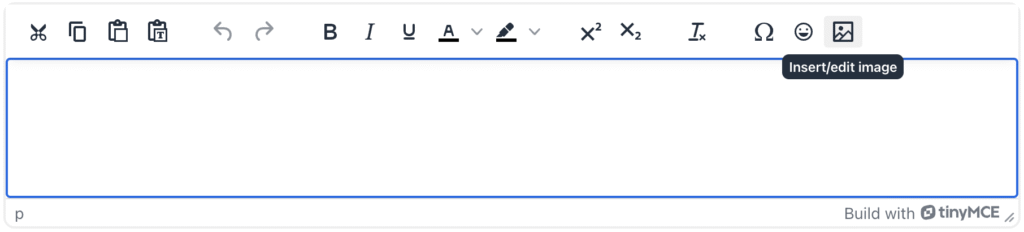
Once you’ve uploaded your image, you can click the pink “Copy URL” button to copy the image address to your computer clipboard. You can then add your image to a custom question by clicking on the image icon in the editing box:
Finally, paste the image URL into the “Source” field and click the “Save” button:
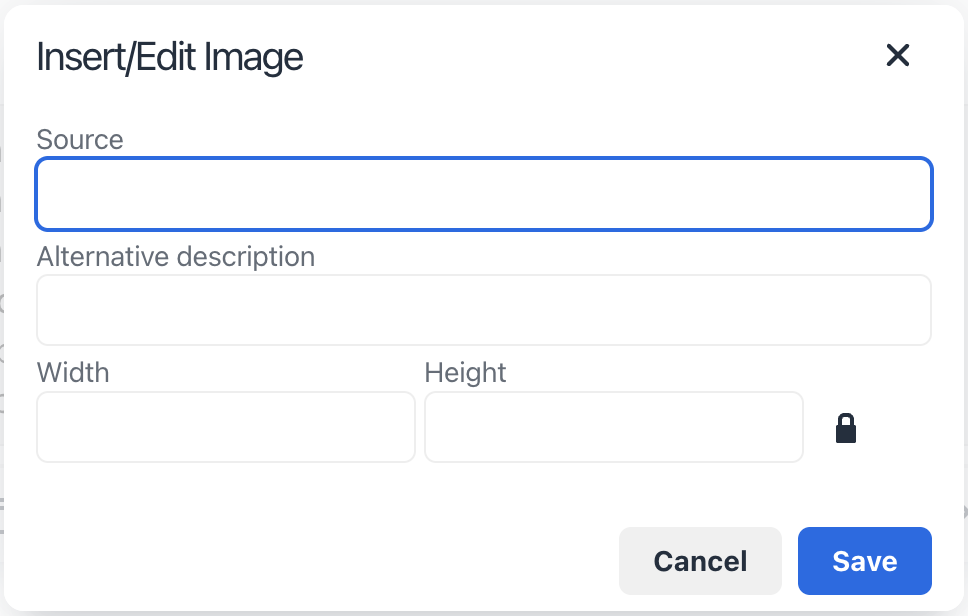
I recommend including a text description of your image in the “Alternative description” for any students you may have with visual impairments. You can also modify its width and height if your image doesn’t display properly in your Question Banks assignments.
PLEASE NOTE: Any uploaded images will be publicly viewable by students at your school and must not violate the ChemQuiz.net Terms of Service. I updated Section 4 of the Terms of Service to include uploaded images, so make sure you review these terms before using this feature!
I hope the new Images upload feature makes Questions Banks and ChemQuiz.net more useful to you and your students! Thanks again to Pamela and Casey for the original suggestion – this is a great example of how feedback from teachers and students helps me to improve the site, so please keep sending in your ideas.
*NEW* anti-cheating security feature!
Even though I originally intended ChemQuiz.net to be used for low-stakes practice, I’ve heard from a number of teachers that they also use the site for assessments, which is great! I use formative assessment in my classes, so when a student goes through all of my written quizzes on a topic and still wants to try to improve their grade, I’ll create a quick make-up quiz on ChemQuiz.net to give them the chance to prove that they understand the material.
However, we’ve all seen how AI has made it easier than ever for students to cheat, so I’ve added a new security feature to discourage cheating – automatic submission when a student switches browser tabs!

If you activate this optional feature on an assignment, when a student switches away from their assignment on ChemQuiz.net to a different browser tab, any answers they have so far will be automatically submitted for scoring. It’s not a fully secure browser, but my hope is that this new feature makes it a little easier for teachers to monitor their classes as they take an assessment.
I strongly recommend that you try out this feature with a test account or demonstrate it in class so that your students aren’t surprised if they switch tabs and their quiz is automatically submitted. Try it out and let me know what you think!
New features, bug fixes & other improvements
In addition to the new features listed above, I’ve also added new features and made corrections and bug fixes across ChemQuiz.net, all of which are listed below:
Dashboard – these features and bug fixes also apply to PhysQuiz.net!
- new feature: added a setting to only display active assignments on the Change Assignment Order page (thanks, Zack!)
- new feature: added an “automatically submit on browser tab switch” security option for assignments
- enhancement: added a “Clear Assignment Order” button on the Change Assignment Order page
- enhancement: improved sorting of exemplar assignments
- enhancement: updated the “Score override” text on quiz results so that the date and time is easier to read
- bug fix: saving a score override on the Result Details page could result in scores greater than 100% (thanks Jon, Matt, Katherine & Jennifer!)
- bug fix: some assignment settings were being wiped out when creating a Question Banks assignment
- bug fix: fixed the display order of assignments on the Assignments page when custom sort order was being used for some (but not all) assignments
- bug fix: empty options on some assignments on the Exemplars page were being displayed
Exams
- bug fix: the first question of each table on the Result Details page wasn’t showing a score override checkbox (thanks, Kendra!)
- bug fix: submit button was showing “Display Printable Exam and Key” to students at the end of an exam
- new feature: new image uploads for question banks! 🤩
- new feature: added ability to select a certain number of questions from each bank in a single assignment (thanks, Casey!)
- enhancement: updated Terms of Service to reflect new image uploads feature
- bug fix: units for numeric questions were being wiped out when saving a question (thanks, Pamela!)
- bug fix: “Here’s how you did” message was showing up on keys for printable quizzes
Balancing, Identifying & Predicting Chemical Equations Quiz
- bug fix: some chemical equations for other quizzes were being included in identifying problems (thanks, Nick!)
- bug fix: some change in entropy (∆S) word problems left out the necessary ∆H value when asking for ∆T (thanks, Mary Ann!)
- bug fix: some chemical equilibrium (K) word problems left out the necessary T value when asking for ∆G (thanks again, Mary Ann!)
- bug fix: electrolysis problems that solved for time were generating an incorrect answer (thanks, Lincoln!)
- bug fix: free energy problems were sometimes using the wrong number of electrons for answers (thanks, Patrisha!)
- bug fix: line breaks were being displayed before the question in printable mode
- correction: formulas for 1-butyl-1-propylcyclobutane, 1-butyl-2-propylcyclobutane, and 1-butyl-3-propylcyclobutane were C10H18 but should have been C11H22 (thanks, Gavin!)
Stoichiometry & Limiting Reagents Quiz
- bug fix: quiz was crashing when only liters were selected at the main menu (thanks, E.!)
Thanks again to everyone who has sent in a suggestion or reported a bug! If you come across any problems or issues while using ChemQuiz.net, please fill out this short Contact form and I’ll do my best to fix it as soon as possible.
Site licenses for the ChemQuiz.net Dashboard
By now, most of you who have an active site license should have received an invoice to renew your ChemQuiz.net Dashboard site license for the 2025-2026 school year. Some of the renewal invoices were sent through Square, so make sure to check your “Spam” folder. If you didn’t receive an invoice, or if you need a sales quote instead, please reach out and I’ll be happy to send you whatever documentation you need.
If you’re considering purchasing a site license for the ChemQuiz.net Dashboard, now’s a great time to do it! With an active site license, you can:
- create assignments for your students using the quizzes on the site
- select the options you want that best match your students’ needs, including advanced options
- allow your students to save their progress
- build exams from multiple assignments
- create custom question banks with your own questions and images or use questions shared by the ChemQuiz.net educator community
- use the “tab switch detection” anti-cheating feature
- review results with your students so they can correct misconceptions and grasp concepts more quickly
- track your students’ progress and download results for data analysis
- create custom rubrics to score assignments
If you’d like to purchase a 12-month site license for just US$70, you can do so in any of the following ways:
- credit card through Square (the most popular option)
- school purchase order (contact me for a sales quote!)
- CashApp, PayPal, or Venmo at chris@chemquiz.net or @ChemQuizDotNet
Additional schools in the same district can purchase an add-on license for 50% off at just US$35 per school.
If your school offers physics, you can also bundle a site license for the PhysQuiz.net Dashboard for just US$35 more!
Site licenses also make it possible for me to make the ChemQuiz.net Dashboard free for almost 200 U.S. public schools with a majority of students who are economically disadvantaged. If you teach in a high poverty public school in the United States (at least 50% of your students on free/reduced lunch or designated “economically disadvantaged”), just send me a link to the supporting documentation and you’ll get a free site license for the ChemQuiz.net Dashboard forever – PhysQuiz.net, too!
Help me share ChemQuiz.net with the world!
If you like using ChemQuiz.net, there are three quick and easy things that you can do to help me promote the site!
- Add your school to the list of supporters on the About page! Simply go to the ChemQuiz.net Dashboard, click on “Your Info” in the top menu bar, activate the box next to “Display School on ChemQuiz.net“, and click the “Update Your Info” button.
- Tell another Chemistry teacher about ChemQuiz.net and encourage them to try out the Dashboard!
- Follow @ChemQuizDotNet on BlueSky 🦋 and share my updates with your fellow Chemistry teachers!
Thanks to everyone who filled out the LMS survey that I shared in the last newsletter! I appreciate all of the helpful feedback I received, but If you haven’t responded already, you can still fill it out! This will help me make plans for LMS integration with ChemQuiz.net this summer.
For those of you in the Northern Hemisphere, I hope your school year is wrapping up nicely! I sat down last week to plan out the remaining weeks of school with my colleague who also teaches Advanced Chemistry, and we were amazed at how little time we have left to get through everything we want to cover. We’re planning a “lab practical” semester exam based on “Experiment #14A: Separation and Qualitative Analysis of Cations” in Advanced Chemistry with Vernier, which is an excellent resource. We still need to show our kids how to use a centrifuge and we’re running out of time! 😱
Thanks so much for your continued support of ChemQuiz.net! Please contact me any time using the Contact form or by emailing me at chris@chemquiz.net if you ever have any questions, comments, or concerns. For those of you who teach AP or IB Chemistry, good luck to your students this month!
-Chris